
This article shows how to stop asking AI the wrong way by using better prompts, especially the RACE framework (Role, Action, Context, Expectation). You’ll also learn how to protect your voice, choose the right AI tools, and rebuild your workflow so AI actually saves you time.
Why do most people use AI the wrong way?
Most people use AI the wrong way because they treat it like a search box instead of a collaborator. They ask vague questions, skip context, and expect perfect results. This guide shows how better prompts, the RACE framework, and workflow changes can fix that.
Artificial intelligence is no longer something people use only to experiment with. It is becoming part of how we write, research, create, communicate and get work done.
But while using AI regularly, I have realised that simply opening ChatGPT or Gemini and asking a question is not always enough. The real advantage comes from knowing how to communicate with AI, choosing the right tool for the task and finding ways to build AI into our everyday workflow.
As someone learning software development and exploring AI, these are some of the ideas that have changed the way I think about using it.
The RACE Framework: Role, Action, Context, Expectation
Prompt engineering is the practice of designing clear, structured instructions for AI; for a broader overview, see this comprehensive prompt engineering guide [DAIR.ai’s Prompting Guide]
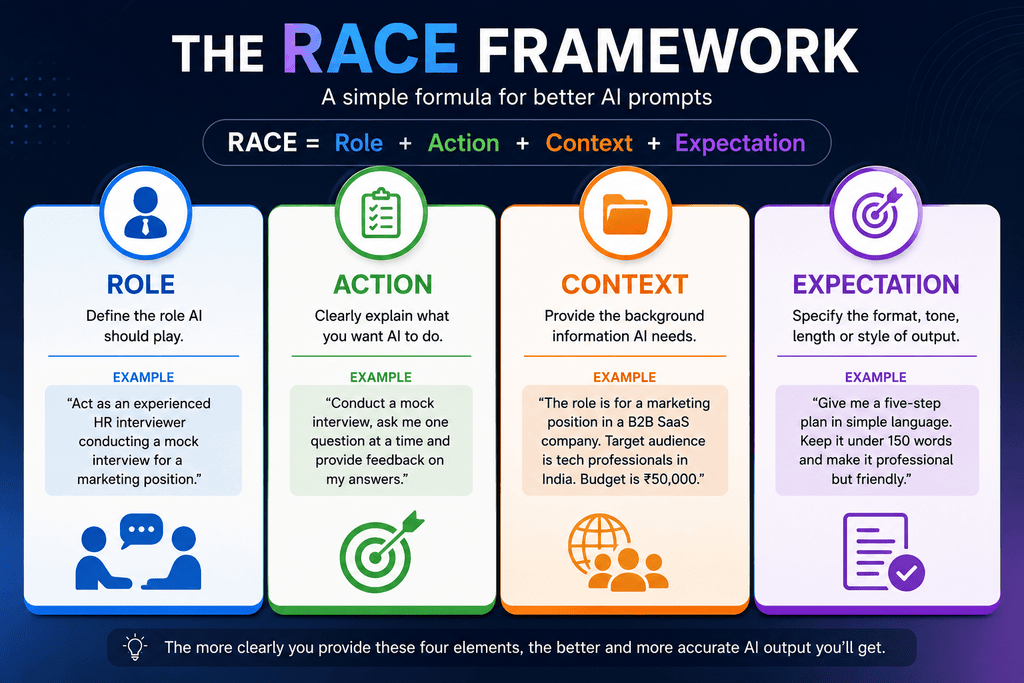
One of the simplest concepts I came across in prompt engineering was RACE — Role, Action, Context and Expectation.
What is RACE Framework for prompts?
The RACE framework is a prompt structure that stands for Role, Action, Context and Expectation. It helps you give AI a clear brief so it produces more relevant, usable results instead of generic answers.
It is essentially a way of giving AI a better brief instead of leaving it to guess what you want.
Role
Start by telling AI who you want it to act as.
For example, if you are preparing for a job interview, you could say:
“Act as an experienced HR interviewer conducting a mock interview for a marketing position.”
If you’re planning a business campaign, you might ask it to act as a marketing strategist.
The role helps establish the perspective from which AI should approach the task.
Action
Next, clearly explain what you want AI to do.
Instead of saying:
“Help me prepare for an interview.”
You could say:
“Conduct a mock interview, ask me one question at a time and provide feedback on my answers after the interview.”
Similarly, instead of asking AI to “write an email,” you could tell it to draft a professional follow-up email for a client who has not responded to a proposal.
The more clearly you define the task, the less AI has to guess.
Context
This is where you provide the background information AI needs to give you a relevant answer.
Suppose you want AI to help you create a marketing plan. You could provide information about your business, target audience, budget, location, existing customers and objective.
Or, if you’re a student asking AI to explain a topic, tell it your current level of understanding and what you’re preparing for.
Without context, AI has to make assumptions. With relevant context, it has a much better starting point.
Expectation
Finally, tell AI what you want the final output to look like.
You could specify the length, format, tone or level of detail.
For example:
“Give me a five-step plan in simple language.”
Or:
“Keep the email under 150 words and make it professional but friendly.”
This is particularly useful because even when AI understands the task, the first response may not be in a format that is actually useful to you.
RACE isn’t about making every prompt unnecessarily long. It’s about giving AI the information it needs to produce the result you’re actually looking for.
Keep Your Voice: Train AI on Your Writing Style
Another lesson I found particularly useful is that AI does not have to replace your personal voice.
If you want AI to write something that actually sounds like you, give it examples of your previous work.
It could be an email, an Instagram post, an article or any other piece of writing.
For example, instead of simply asking AI to “write professionally,” you can provide a few examples of your previous writing and ask it to use them as a reference for your tone and style.
This can be useful for people who regularly write emails, social media posts, reports, presentations or other professional content.
AI should help you communicate better without making everyone sound the same.
How can I use AI without losing my own voice?
You can use AI without losing your voice by giving it examples of your own writing and asking it to match your tone and style. This way, AI helps you communicate better while your content still sounds like you.
Google’s latest guidance emphasizes creating valuable, original content even when using AI, instead of mass‑producing low‑effort posts. [Google’s guidance on AI‑generated content]
How do I collaborate with AI instead of just instructing it?
To collaborate with AI, ask it to ask you questions first about your goals, audience, budget and constraints. Those questions uncover missing context and turn AI into a thinking partner, not just an order taker.
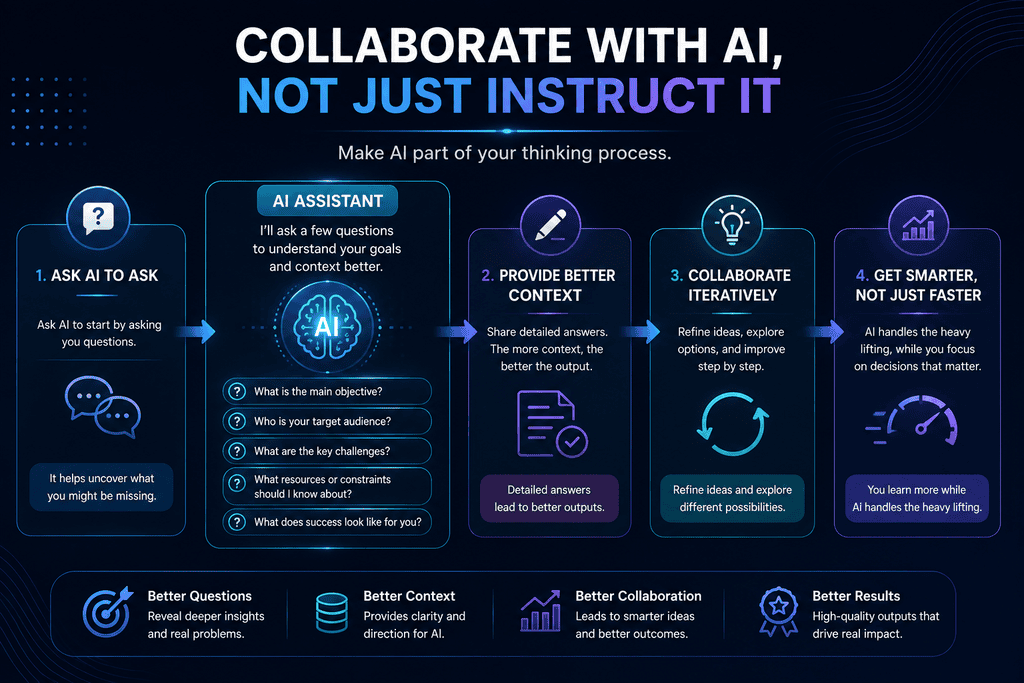
Collaborate With AI Instead of Just Instructing It
Another approach I learned is to make AI part of the thinking process.
Instead of immediately asking it to complete a task, tell it to ask you questions first.
For example, if you want AI to help create a business plan, ask it to first ask you questions about your customers, budget, competition and goals.
The same approach can work when preparing a presentation, planning a trip, creating a study plan or even making an important purchase.
Those questions can help uncover information you may not have thought about and give AI better context before it generates the final result.
The process becomes less about simply giving instructions and more about working through a problem with AI.
Which AI tools should I use beyond ChatGPT and Gemini?
Beyond ChatGPT and Gemini, you should use specialized tools for specific tasks: image generation, music, video, meeting notes, app building and coding. Choosing the right tool for each job makes AI far more useful than one general chatbot.
One of the biggest lessons I took from exploring AI is that we should not expect one chatbot to be the best tool for every task.
ChatGPT and Google Gemini are powerful general-purpose AI assistants, but an increasing number of specialised tools are being designed around particular workflows.
For image generation and editing, Google’s Nano Banana 2 is designed for fast image generation and editing.
For music creation, Suno allows users to generate songs using natural-language descriptions.
For AI-generated video and visual content, Kling AI offers tools for creating and editing videos and images.
For meetings, Fireflies.ai can record, transcribe and summarize conversations and identify action items. Its mobile app can also be used to capture in-person conversations, although users should always consider consent and applicable recording laws before recording others.
For people who want to build applications using natural-language instructions, Base44 can help create functional applications without requiring users to build every component manually.
And for developers, Claude Code is an agentic coding tool that can work directly with a codebase and assist with software development tasks.
The point isn’t that everyone needs to use all these tools.
The point is to choose the right tool for the job instead of forcing one AI to do everything.
How can I rebuild my workflow around AI?
Rebuild your workflow around AI by using it at multiple stages: research, outlining, drafting, editing and final review. Instead of asking “Can AI do this task?”, ask “Which parts of this workflow can AI make faster or easier?”
The next step is more important than simply learning individual AI tools: change your workflow.
Suppose you need to create a presentation.
Instead of starting with a blank PowerPoint file, you could first use ChatGPT or Gemini to research the topic, brainstorm ideas and create a structured outline.
You could then take that structure into Microsoft PowerPoint and use its AI capabilities to help turn the outline into slides.
After that, you can review the presentation, correct anything inaccurate, add your own ideas and make the final decisions.
The important part is that AI is being used at multiple stages of the same workflow, rather than being treated as a chatbot you visit whenever you get stuck.
The same approach can be applied to research, writing, marketing, sales, data analysis, presentations and many other professional tasks.
Instead of asking:
“How can AI help me with this task?”
start asking:
“Which parts of this workflow can AI make faster or easier?”
That small change in thinking can make AI much more useful.
5 ways to work better with AI
- 5 ways to work better with AI starting today
- Use the RACE framework for every important prompt.
- Give AI examples of your own writing to preserve your voice.
- Ask AI to ask you questions before it generates final output.
- Use specialized tools for images, video, music, meetings and coding.
- Treat AI as a multi‑step workflow partner, not a one‑off chatbot.
What are AI agents and how are they different from chatbots?
AI agents are systems that can take a goal, break it into steps and use tools to complete tasks, while chatbots mainly respond to your instructions. Agents can research, organize, draft and save work with less manual effort, but still need human oversight.
The next step is AI agents.
A traditional chatbot primarily responds to your instructions. An AI agent can take a goal, break it into multiple steps and use available tools to work towards completing it.
| Type | What it does best | Example Use |
| Chatbot (e.g., ChatGPT, Gemini) | Answering questions, drafting text, brainstorming | Writing emails, explaining concepts |
| Specialized AI tool | One type of task very well (images, music, video, meetings, code) | Generating images, transcribing meetings, building apps |
| AI agent | Taking a goal, planning steps and using tools to complete work | Researching a topic, creating a document and saving it automatically |
Claude Code is one example of this approach in software development. Instead of simply explaining how to write code, it can work with a project, inspect files, make changes and execute development tasks.
The same idea is likely to expand beyond software development.
Imagine giving an AI agent a business task and having it research information, organize the findings, create a document and save the finished work without requiring you to manually handle every step.
This is where AI becomes more than an assistant that answers questions. It starts becoming an assistant that does work.
However, greater autonomy also means greater responsibility.
AI agents can make mistakes, misunderstand instructions or take actions that were not intended.
AI should reduce our workload, not eliminate our responsibility for the final result.
AI Is Changing the Way We Work
After learning about these different approaches, my biggest takeaway is simple:
Don’t just learn how to use AI. Learn how to work with AI.
Write better prompts.
Give better context.
Protect your own voice.
Use specialised tools when they make more sense.
Connect different AI tools into your workflow.
And gradually learn how AI agents can handle repetitive and multi-step tasks.
I don’t think the most useful question is simply:
“Will AI take my job?”
A better question is:
“How much of my current workflow can I improve by learning to use AI properly?”
AI will automate some tasks and change others. Some roles will evolve, and new opportunities will emerge.
But one thing I believe is becoming increasingly clear: people who learn how to work effectively with AI will have an advantage over those who refuse to adapt.
So instead of spending all our time worrying about AI changing the workplace, I’d rather spend that time learning how to use that change to my advantage.
Because the future may not belong to people who simply know about AI.
It may belong to people who know how to make AI work for them.
Frequently asked questions
Is AI content penalized by Google?
Google does not penalize content just because it’s created with AI. It penalizes low‑quality, spammy or manipulative content, whether human‑written or AI‑generated. Focus on original insights, real experience and useful information, and follow Google’s guidance on AI content.
What is the best way to write prompts for AI?
The best way to write prompts is to use a clear structure like RACE: define the Role you want AI to play, the Action it should take, the Context it needs and your Expectation for the output. This reduces guesswork and improves relevance.
How are AI agents different from chatbots?
Chatbots mainly respond to your instructions, while AI agents can take a goal, break it into steps and use tools to complete tasks. Agents can research, organize and create work with less manual effort, but still require human oversight.
Can AI replace my job?
AI is more likely to change and automate parts of your job than replace it entirely. People who learn to work effectively with AI, using better prompts, workflows and tools, will have an advantage over those who refuse to adapt.